

A day at the Minnesota State Fair revealed how much of one growing business still depended on its owner.
| This is a composite story drawn from recurring discovery conversations with owners of businesses in Minnesota and western Wisconsin. Names and identifying details have been changed. |
The discovery meeting started on a Tuesday morning at a family-owned company in east-central Minnesota. The building had been added onto more than once. Pickup trucks moved through the gravel lot, and the front office stayed busy without much fuss.
The company was not in crisis. It was profitable, well known in the area, and more complex than it had been five years earlier. The owner had agreed to meet because, as he put it, “we should probably get a better handle on the computer stuff.”
Email worked. The accounting system worked most days. Employees usually found a way around small problems. Yet no one could give a clear answer when I asked who owned the company’s admin accounts, where important passwords were kept, or what happened when the owner could not be reached.
He knew many of the passwords. Some were in a notebook in his desk, and others were saved on his phone. The office manager knew a few more. There was no secure company record and no clear backup plan if the owner was away.
That question reminded him of a family trip the summer before.
The day the passwords went to St. Paul
“My wife would tell you I learned this lesson at the State Fair last year,” he said.
The family drove down to St. Paul for the day. The youngest grandchild had already spent a little too long in the car, so the owner handed over his phone and turned on a cartoon. It bought everyone a quieter end to the drive, but it also used most of the battery before they reached the fairgrounds.
Once inside, they did the Fair properly. There were cheese curds before lunch, a walk through the animal barns, more steps than anyone had planned, and a bucket of Sweet Martha’s cookies that grew lighter each time it went around the family.
By late afternoon, the grandchild had reached his limit. His parents took him home before the Grandstand show, while the owner and his wife stayed for the evening.
“My phone was almost dead by then,” the owner said. “I figured that was probably a good thing. For once, I wouldn’t be checking it every five minutes.”
He put it in his pocket and forgot about it.

Back home, the power went out at the business. The outage was brief, and most of the building came back when power returned. The lights came on. The phones worked. Most computers restarted.
One system used by the second shift did not.
The office manager was still there because she was setting up a computer and account for a new employee. After the outage, she could not finish the setup. The second-shift crew also could not open the system they used for work orders and shipping.
The company did have someone who helped with computers. The neighbor’s son had been doing it since high school and was good at it. He had fixed odd problems, recovered files, and kept old equipment running. He had helped the company many times.
But he was now away at college. He had never agreed to provide support at all hours, and no one expected him to drive home because a system failed to restart. The company had slowly begun treating his helpful, informal work as if it were a complete support plan.
When he did not answer, employees called the owner.
The grandstand show ended around ten-thirty. When the owner reached the truck and plugged in his phone, it came back with missed calls and messages from the office manager, the shift supervisor, and several employees.
On the drive home, he tried to piece together what had happened. The office manager needed an admin account to finish the new employee setup. The shift supervisor wanted to know if the failed
system could be restarted safely. Someone thought the right password might be in the owner’s desk, but no one knew which notebook held it or whether it was current.
The owner stopped at the office on his way home. By the time he found the information people needed and helped decide what could be restored that night, it was after midnight.
“What bothered me wasn’t that the power went out,” he said. “Power goes out, and equipment does not always come back the way it should.”
He looked down at the legal pad on the conference-room table.
“What bothered me was that the company still depended on me being reachable. I was supposed to be taking one day off with my family, but the minute something unexpected happened, everyone needed something only I knew or could approve.”
Then he summed it up in one sentence.
“I hadn’t really taken the day off. I had just postponed my work day until after the show.”
The problem was bigger than passwords
The owner had not been careless, and the neighbor’s son had not failed the company. Both had done what people in growing businesses often do: solve the problem in front of them and keep moving.
The arrangement had also made sense when the company was smaller. There were fewer people, fewer computers, and fewer online services. The owner could keep the details in his head because there were not many details to keep.
Then the business grew one customer, one employee, and one building addition at a time. New software was added. Staff began working from home. Vendors created new accounts. Cyber insurance asked questions no one had asked ten years before.
No single choice caused the problem. The pieces simply piled up, while the owner remained the person who connected them.
That is how a company can have help without having control. Someone may be able to fix a computer or reset a password. That does not mean anyone is tracking the full picture: who owns each account, who has admin access, whether backups can be restored, what equipment is getting old, and what should be planned next.
The first step was not a cart full of new computers. It was to write down what the company owned and who was responsible for it.
The company created a current list of systems, equipment, online accounts, vendors, and renewal dates. Admin passwords moved out of notebooks and personal phones into a secure system owned by the business. Employees received one clear way to ask for help, instead of choosing between the owner, a vendor, or a private text message.
The company also set a basic standard. Computers had to run supported software. Backups had to follow a known plan. Admin access had to be given for a reason and removed when it was no longer needed. Aging equipment was placed on a schedule instead of being replaced only after it failed.
Changes that could affect security or daily work were reviewed before they were made. If a software or equipment vendor needed a network change, the vendor explained the need. The company’s IT provider reviewed the request, made the approved change, and documented it. The vendor was not given the firewall password or open access to the network.
This was not red tape. It was a way to stop small requests from creating large surprises.
The cyber insurance form was telling them something
Near the end of the meeting, the office manager brought out the latest cyber insurance renewal. It asked whether multifactor authentication was required, whether admin accounts were separate from daily user accounts, whether backups were watched and tested, and whether the company had a written response plan for a cyber incident.
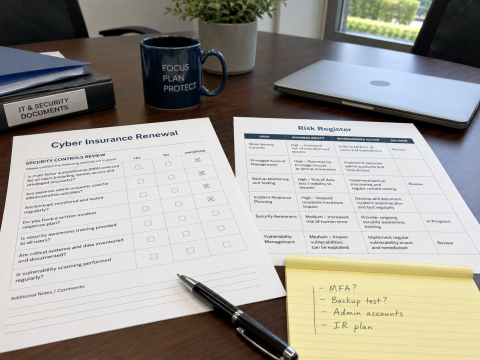
The owner and office manager could answer some questions. On others, they were making fair guesses. They knew backup software was installed, but they did not know when a recovery had last been tested. They believed multifactor authentication was in place, but they were not sure it covered every admin account.
They also had antivirus software, including more than one brand. Yet they could not show that every computer had a paid business version, who reviewed serious alerts, or what would happen after a real attack.
The insurance form did not create those gaps. It showed how much the company had been assuming.
A simple risk register gave the leadership team a better way to work. It listed the issue, the effect it could have on the business, the next step, and the decision. Not every risk had to be fixed at once. Some work could wait until the next budget cycle.
The key was that risks no longer disappeared into an email or returned as a surprise on the next insurance form. The owner could choose to leave a risk in place for a time, but the choice was now clear and recorded.
Six months later, the change was quieter than expected
Six months later, the company did not look like a technology showroom. Employees still used the same business software. Most of the computers were still in service, and the owner still took part in decisions that affected cost, timing, or risk.
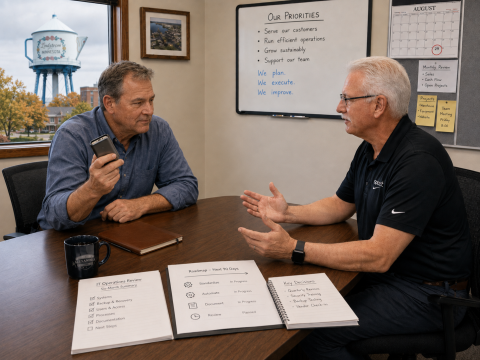
The important changes were behind the scenes. The company had a current inventory, company-owned admin accounts, secure password storage, and one support path for employees. Access was reviewed when people joined, changed jobs, or left. Backups were monitored, and a recovery had been tested. Leadership could see the open risks and the work planned for the next year.
The neighbor’s son was still part of the family’s life, but the business no longer waited for him to come home from college. There was even talk that he might make a good consultant for our team one day. That would be a career choice, not an emergency support plan.
The roadmap still had open items: one old application and several workstations due over the next year. The systems were not perfect, but the work was visible, assigned, affordable and manageable.
At the end of the six-month review, the owner said the State Fair was coming again. The family had already picked another grandstand show. He planned to bring a battery pack because the youngest grandchild would probably want cartoons on the drive to St. Paul.
“This year,” he said, “the battery pack is for the kid, not for the business.”
The better question for a growing business
The State Fair story did not reveal a lack of effort. The owner, office manager, neighbor’s son, and vendors were all trying to help. The problem was that support depended on who happened to be available, and no one was responsible for the whole picture.
Most businesses already have someone who can reset a password or fix a computer. The harder test is whether the company can keep working when the owner cannot answer, a key employee leaves, or a vendor asks for a change that deserves more than a quick yes.
Leadership should know who controls administrative access, whether backups can be restored, which risks remain, and what technology spending is coming next. Support gives employees someone to call. Control gives the business a clear owner, a clear plan, and a clear next step.
About the Author
matt@thebitworks.com
CEO